
Quick Answer
The most common LinkedIn mistakes are a weak headline, a generic About section, and duty-based experience bullets. Others include a lack of a clear niche, generic connection requests, unprofessional posts, and an inactive profile. Fix these by writing a keyword-rich headline and quantifying results. Network relationally, not transactionally, and review your profile and analytics regularly.
Key Takeaways
- Recruiters rely on LinkedIn to source candidates, so profile gaps limit your opportunities.
- Your headline and About section carry the most search weight. Default text and buzzwords hurt visibility.
- Experience bullets need numbers and outcomes, not resume-style duties.
- A focused niche helps people and LinkedIn’s algorithm understand what you offer.
- Generic connection requests and early asks get ignored more than relational outreach.
- Treating LinkedIn like Facebook or Instagram, or chasing likes over trust, damages credibility.
- Consistency across LinkedIn, your resume, and any personal website builds trust and credibility.
- A regular audit, including your profile analytics, prevents most mistakes.
What’s Inside
You spend hours polishing your resume, then treat LinkedIn as an afterthought. That gap costs you interviews. Recruiters check LinkedIn before they call you, and small profile mistakes can remove you from consideration.
This guide covers the LinkedIn mistakes that most often hurt early-career professionals and shows how to fix each one. These fixes build on our guide to optimizing your LinkedIn profile.
What Counts as a LinkedIn Mistake
A LinkedIn mistake is any gap in your profile or activity. Gaps like these make you harder to find, less credible, or less memorable to recruiters. LinkedIn mistakes fall into five categories: profile foundation, content and experience, personal branding, networking behavior, and algorithm visibility.
Each category affects how recruiters evaluate you. Profile foundation mistakes hurt your searchability, while branding mistakes cloud your clarity. Networking mistakes damage your relationships, and content mistakes undercut your credibility. Visibility mistakes limit your long-term discoverability.
Quick Reference: The Five Mistake Categories
- Profile Foundation: headline, photo, About section, Featured section
- Content and Experience: bullet writing, keywords, skills
- Personal Branding: niche clarity, original voice, posting consistency
- Networking Behavior: connection requests, follow-up, recruiter replies
- Algorithm & Visibility: search optimization, analytics, chasing likes over trust
Why LinkedIn Mistakes Cost You Opportunities

Most recruiters use LinkedIn as their primary sourcing tool. 87% regard it as the most effective platform for evaluating candidates (Zippia). Hiring managers spend 7 seconds on an initial profile scan. Weak positioning blocks opportunities before a conversation starts.
59% of organizations rank social media, including LinkedIn, as their top recruiting strategy (SHRM). LinkedIn’s algorithm reads profiles and posts for meaning, not just keywords. It builds an identity profile that routes you to relevant searches. LinkedIn cannot accurately interpret a vague, unfocused profile, so it may never reach the right recruiters.
Mistakes also compound. A weak photo reduces trust, a generic headline reduces search visibility, and a bland About section weakens positioning. Together, they make a capable candidate look forgettable.
Because most early-career candidates share similar qualifications, small differences in profile quality decide who gets contacted first. A personal brand website gives recruiters a deeper, more consistent view of your work than LinkedIn alone provides.
What recruiters weigh most when searching your profile:
| Profile Element | Search Weight | Common Mistake |
|---|---|---|
| Headline | Very high | Contains only a job title |
| Current role title | Very high | Uses an internal title that does not match search terms |
| Skills section | High | Empty, or filled only with soft skills |
| Location | High | Not set, or set to the wrong city |
| About section | Medium | Generic text with no target keywords |
| Experience titles | Medium | Titles that do not match market terminology |
| Education | Low to medium | Incomplete or missing graduation year |
| Connections (500+) | Indirect | Profile ranked lower below the threshold |
Profile Foundation Mistakes
Weak or Default Headline
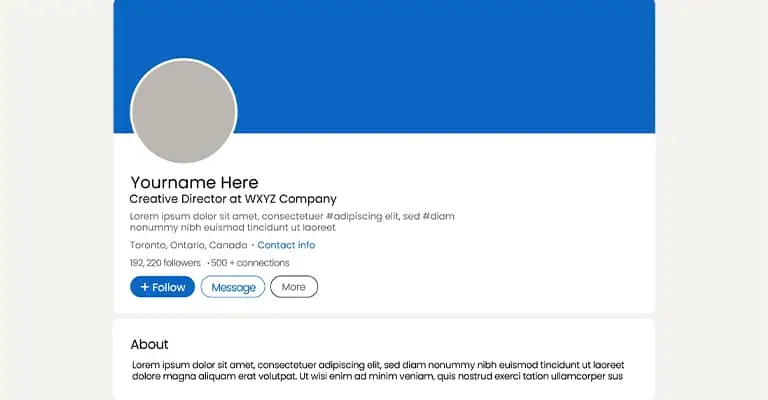
Your headline is the most visible text on your profile. It appears in every search result, comment, and connection request. LinkedIn generates a default headline from your job title, and most people never change it.
The fix: Use the Role, Skills, and Value formula. Combine your role, two to three skills from real job postings, and what sets you apart. If your headline still shows only your job title, rewrite it today. For more examples, see our headline formulas that work.
| Weak Headline | Stronger Headline |
|---|---|
| Marketing Student | Junior Digital Marketer | SEO, Content, GA4 | Helping local brands grow online |
| Recent Graduate | Finance Graduate | FP&A, Excel Modeling, Dashboards | Targeting analyst roles |
| Looking for opportunities | Entry-Level Recruiter | Sourcing, Screening, Candidate Experience | Open to agency or in-house roles |
| Founder | Sales | Events | Consulting | Event Operations Coordinator | Staffing, Client Communication, On-Site Execution |
Missing or Casual Profile Photo
A missing or casual, low-quality photo signals you aren’t serious. Recruiters judge your photo before reading a word of your profile. A professional headshot gets roughly 21 times more views and 9 times more connection requests than a profile without a photo (LinkedIn).
The fix: Use a clear, recent headshot with a plain background and professional attire. Face a window for natural light, crop to head and shoulders, and use a minimum of 400 by 400 pixels.
Generic About Section
An empty About section wastes your best chance to tell your story. Vague words like “passionate” or “hardworking” say nothing specific about you. Only your first two or three lines show before someone clicks “see more,” so they have to earn it.
The fix: Structure your About section into four parts: identity, two proof points, your target role, and a contact prompt. Keep it under 400 words and write in first person.
Ignoring the Custom URL, Featured Section, and Recommendations
Small profile details signal polish. A random default URL looks unfinished. An empty Featured section (where you pin your best work) wastes a chance to show your skills. Zero recommendations weaken your social proof: evidence that others vouch for you. Complete profiles are 40 times more likely to receive opportunities through LinkedIn (CUNY).
The fix: Customize your URL to linkedin.com/in/firstname-lastname in Settings. Pin two or three of your best assets in the Featured section. Request one outcome-focused recommendation using our recommendations guide, and name the project you want mentioned.
Content and Experience Mistakes
Listing Duties Instead of Results
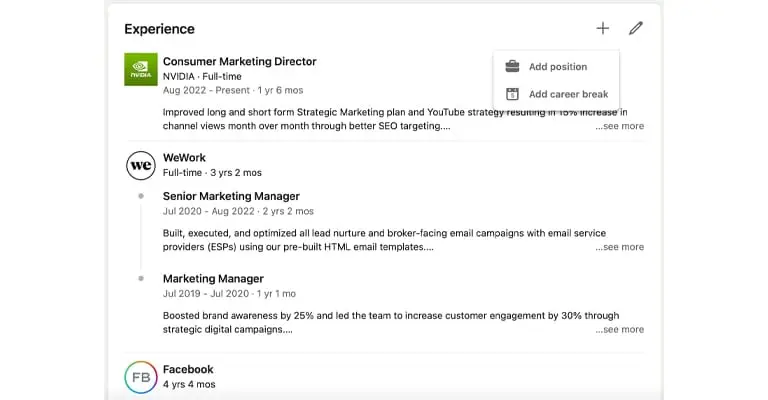
“Managed social media” adds nothing beyond your job title. Without numbers, your experience section reads like every other candidate’s. A useful rewrite prompt: ask what changed as a result of what you did.
The fix: Add a metric to every bullet. If a bullet has no number, rewrite it. If exact numbers aren’t available, use a relative comparison.
| Task-Based Bullet | Outcome-Based Bullet |
|---|---|
| Managed social media accounts | Planned 4 to 5 weekly posts across Instagram and TikTok, raising engagement from 2.1% to 5.4% in 3 months |
| Helped with email campaigns | Built and sent a monthly newsletter to 2,000 subscribers with a 41% average open rate through segmentation |
| Worked on reports | Built a dashboard tracking clicks, conversions, and cost per lead for monthly leadership reviews |
| Supported the sales team | Researched and pre-qualified 60+ leads per week, contributing to a 22% increase in pipeline |
Turning “No Experience” Into Proof of Work
Without formal job history, projects, volunteer leadership, and self-initiated work count as experience if you format them correctly. For example:
- Title: “SEO Project: Personal Blog on Coffee Culture”
- Designed and launched a blog targeting long-tail coffee and sustainability keywords
- Performed keyword research on 20+ topics and published 10 SEO-optimized articles
- Achieved approximately 500 monthly organic visits within 4 months with zero ad spend
Missing Keywords for Recruiter Search
Recruiters filter candidates using specific keywords, not general job categories. If your profile doesn’t include the exact terms they search for, you stay invisible.
The fix: Review 10-15 target job postings and extract recurring terms. Place those phrases in your headline, About section, and experience bullets.
Ignoring the Skills Section
Skills act as search filters for recruiters. A short or outdated list means fewer relevant searches, even when your experience qualifies you.
The fix: List 10-20 skills that align with your target roles. Pin your top three, and ask former managers or classmates to endorse them.
Personal Branding Mistakes
No Clear Professional Niche
A profile pointing in too many directions is hard for people and LinkedIn’s algorithm to classify. Being open to anything reads as a lack of focus, not flexibility.
The fix: Choose two or three pillars, meaning core topics you want to be known for. Align your headline, About section, content, and skills around them. Our personal brand statement examples help you put your pillars into words.
Copying Others Instead of Building an Original Voice
Reposting viral content without commentary produces no original value and erodes trust. LinkedIn limits the visibility of automation-driven or copied engagement.
The fix: Add a specific interpretation, disagreement, or lesson from direct experience. Even two sentences of personal perspective make any content you share attributable to you instead of borrowed.
Posting Only When Job Hunting
Profiles that go dormant for months and then suddenly publish “open to work” content look transactional. Recruiters and peers notice, and the inconsistency undermines your credibility.
The fix: Maintain light, steady activity even when you aren’t searching. One post per week, or a few substantial comments, keeps your network primed before you need it.
Networking and Engagement Mistakes
Sending Generic Connection Requests
A blank or generic connection request gets ignored more often than a personalized one. LinkedIn auto-generates a default note, and most users send it without editing it. Networking works best when you give before you ask, which directly applies to connection requests (HBS Online).
The fix: Use this formula: state how you found them, then explain why connecting makes sense. Don’t ask for anything in the first message.
| Context | Generic | Specific |
|---|---|---|
| Alum outreach | I’d like to connect. | Saw you’re a Michigan State alum working in SEO. Pursuing junior SEO roles and would value staying connected. |
| Hiring manager | Please accept my request. | Your recent post on GA4 was useful. Early-career marketer focused on SEO and content, would love to follow your insights. |
| Event follow-up | Nice meeting you. | Great meeting at the digital strategy panel. Your point about AI search changing keyword research stuck with me. |
Pitching or Asking for Referrals Too Soon
Asking for a job, a referral, or a favor immediately after connecting confuses access with a relationship. The better pattern is connection, then familiarity, then the ask.
The fix: Engage with their posts first. After genuine interaction, make a low-pressure ask, such as a quick request for advice on a role that fits.
Failing to Follow Up After Real-World Networking
Early-career professionals meet useful contacts at events but don’t convert those moments into digital relationships. Following up within 24 to 48 hours makes in-person connections durable. This habit is networking with intention, not by accident.
The fix: Send a LinkedIn request within 24 to 48 hours, referencing one detail from the conversation. This makes the follow-up feel natural, not obligatory.
Ignoring Recruiter Messages
Even when a role isn’t a fit, silence closes future doors. Recruiters remember who replied courteously and who ignored their outreach.
The fix: Send a short reply, even for a decline. Thank them, note the role isn’t a fit, and ask to stay on their radar. It takes 30 seconds and preserves the relationship.
Staying Inactive on the Platform
A profile with no recent posts, comments, or connections appears inactive. LinkedIn’s algorithm surfaces active profiles higher in recruiter search results than dormant ones. Posting weekly increases profile views by up to four times, and commenting weekly triples them (Forbes).
The fix: Comment thoughtfully on posts from people in your target field once or twice a week. You don’t need original content daily to stay visible.
Content and Reputation Mistakes
Treating LinkedIn Like Facebook or Instagram
LinkedIn isn’t the place for personal drama, lifestyle posts, or emotionally impulsive content. Recruiters review your activity history, and unprofessional content travels farther and lasts longer than expected.
The fix: Translate personal experiences into professional lessons instead of raw venting. Before posting, ask whether it helps a recruiter trust you with real responsibility.
Using Buzzwords Without Evidence
Words like “passionate,” “driven,” and “results-oriented” don’t differentiate you unless your profile proves the claim. Strong profiles let evidence carry the adjective.
The fix: Replace the buzzword with the proof. Change “results-driven marketer” to a specific result, such as cutting client cost per lead by 32% through audience segmentation.
Contributing Low-Value Comments
Comments are part of your public reputation. Generic replies like “Great post!” add no value and waste a visibility opportunity.
The fix: Write comments that add an experience-based point tied to your niche. Treat each comment as a sample of your professional judgment.
Oversharing Sensitive Information
Posting personal contact details, emotional disclosures, or sensitive employer information creates credibility and security risks.
The fix: Keep public information professionally relevant. A professional email in your About section works. A home phone number or personal social handle doesn’t.
Algorithm and Visibility Mistakes
Ignoring Search Optimization
LinkedIn is searchable structured data, not just a social feed. Early-career professionals optimize their profile to sound nice, not to be found.
The fix: Review 10-15 target job postings and extract recurring terms. Include those phrases in your headline, About section, and skills section.
Chasing Vanity Metrics and Algorithm Hacks
Vanity metrics are numbers, like likes, that look impressive but don’t reflect influence or trust. Advice about gaming the algorithm with engagement pods (groups that trade fake likes and comments) no longer works. Automated or low-quality engagement reduces your visibility.
The fix: Publish content worth saving, such as frameworks, checklists, or before-and-after comparisons. A saved post has more lasting value than one with generic likes.
Never Checking Analytics
Profile views, search appearances, and your content’s performance show what’s working and what isn’t. They also reveal whether the right people find you. Without this data, optimization is guesswork.
The fix: Review your analytics monthly. Zero search appearances signal that you need keyword optimization.
Consistency and Maintenance Mistakes
Letting Your Profile Go Stale
A profile that hasn’t changed in a year suggests stalled growth, even if your career has moved forward. Recruiters notice outdated titles, missing certifications, and old project references.
The fix: Update your profile every time you finish a project, earn a certification, or take on new responsibilities. If it’s been six months since your last update, treat it as overdue.
Inconsistent Information Across Platforms
The person a recruiter finds on LinkedIn should match your resume and any personal website. Mismatched titles, dates, or descriptions raise doubt about accuracy.
The fix: Cross-check your LinkedIn experience section against your resume whenever you update either. Our guide to keeping your resume and LinkedIn aligned covers this process. A personal brand website makes this easier, becoming the single source of truth for your story.
See It In Action: A Before-and-After Profile Transformation

The example below applies the fixes above, turning a new grad’s forgettable profile into a credible one.
| Profile Element | Before | After |
|---|---|---|
| Headline | Marketing Student | Junior Digital Marketer | SEO, Content, Analytics | Helping local brands grow online |
| About section | Passionate about marketing. Looking for opportunities. | Specific niche, two quantified wins, role target, and a contact prompt |
| Experience bullets | Managed social media | Quantified growth (2.1% to 5.4% engagement), tools used, timeline, and business outcome |
| Activity cadence | No posts for 6 months, then “Anyone hiring?” | Weekly posts or comments tied to growth or project lessons |
| Featured section | Empty | Portfolio link, top-performing post, certification |
| Connection requests | Generic: “I’d like to connect.” | Personalized with context and low-pressure framing |
| Recommendations | Zero | 1 to 2 outcome-specific recommendations |
| Skills section | 3 skills, all soft skills | 12 to 15 skills, including tools and specialties |
Profiles like the “After” version appear more often in recruiter searches. They earn higher acceptance rates and convert more visits into real conversations.
How to Fix These Mistakes: A Step-by-Step Process
- Audit your profile, section by section, as a stranger would.
- Rewrite your headline using the Role, Skills, and Value formula.
- Update your photo if it’s missing, outdated, or unprofessional.
- Rebuild your About section around who you are, what you’ve done, and what you want.
- Add metrics to every bullet in your experience section.
- Choose two or three pillars and align your content around them.
- Update your Skills section with 10 to 20 role-relevant terms.
- Request three recommendations from people who can speak to specific results.
- Personalize every connection request, and reply to recruiter messages within a week.
- Check your profile analytics monthly, and review everything else quarterly.
A Complete LinkedIn Self-Audit Checklist
Profile Foundation
| Status | Tasl |
|---|---|
| ☐ | Headline follows the Role, Skills, and Value formula with keywords from real job postings |
| ☐ | About section opens with your strongest skill or result and ends with a role target and contact prompt |
| ☐ | All experience bullets include quantified outcomes or honest relative metrics |
| ☐ | Professional headshot uploaded, at least 400 by 400 px, taken within the last 3 years |
| ☐ | Custom LinkedIn URL set (linkedin.com/in/firstname-lastname or similar) |
| ☐ | 10 to 20 relevant, searchable skills added |
| ☐ | Featured section populated with 2 to 3 best work samples or links |
| ☐ | At least 1 to 2 written recommendations requested |
Personal Branding, Networking, and Visibility
| Status | Task |
|---|---|
| ☐ | Two or three professional content pillars are defined and reflected across your profile |
| ☐ | Posting or commenting at least once per week, including when not job searching |
| ☐ | No employer complaints, political hot takes, or personal drama posted |
| ☐ | Every connection request includes a personalized note |
| ☐ | Not asking for referrals or favors in the first message after connecting |
| ☐ | Following up within 24 to 48 hours after in-person networking |
| ☐ | Responding to recruiter messages within one week, even with a polite decline |
| ☐ | Review profile analytics at least once per month |
People Also Ask

Do I need a professional photographer for my LinkedIn photo?
No. A smartphone photo works fine with good natural light, a plain background, and a professional expression. Face a window, crop to head and shoulders, and dress as you would for an interview. Recruiters value clarity and professionalism over production quality.
How often should I update my LinkedIn profile?
Review it at least every three months. Update it right after a major project, certification, or role change. Regular updates keep your headline, skills, and experience aligned with your focus, helping recruiters find you. A profile untouched for six months or longer starts to look inactive.
Is it okay to connect with people I have never met?
Yes, as long as you include a short, personalized note explaining why you want to connect. Reference how you found them or a shared interest, such as an alma mater, industry, or event. A personalized note increases acceptance rates compared to a blank request and gives you a reason to stay in touch.
Does posting content matter if I am not job hunting yet?
Yes. Consistent activity keeps your profile visible in recruiter searches and builds your network before you need it. LinkedIn’s algorithm favors profiles with consistent engagement, and an early-built network gives you people to contact when you search. Waiting until you need a job to post looks reactive rather than intentional.
Closing Thoughts
Early-career professionals rarely lose LinkedIn opportunities because of a single dramatic mistake. They lose them to accumulated ambiguity, inactivity, and weak professional signaling. The strongest fixes are the simplest: clarify your role, prove competence with specifics, network relationally, and publish useful thinking consistently.
Your LinkedIn profile is only one part of your professional story. Read more in our guide to personal branding for early-career professionals. Then, build your personal brand website today with Bright Future Branding. Give employers a complete, consistent picture of your value.
FAQ
What is the most common LinkedIn mistake early-career professionals make?
Leaving your headline set to a default like “Marketing Coordinator at Acme” is the top mistake. Your headline appears in every search result, comment, and connection request. It does more work than any other field on your profile. Recruiters search using specific keywords, not job titles. A generic headline keeps you from appearing in relevant searches, even when you qualify for the role.
Why does my LinkedIn photo matter so much?
Your photo is the first thing a recruiter sees, often before they read a word of your profile. A professional headshot gets roughly 21 times more views and 9 times more connection requests than no photo. People judge trust and competence almost instantly. A clear, professional photo gives you an edge before anyone reads your headline or experience.
How long should my About section be?
Keep it under 400 words and write in first person. LinkedIn only shows your first two or three lines before someone clicks to see more. Those opening lines carry the most weight. If they don’t state your focus and a result, most readers never click through. This holds true no matter how strong your background is.
What should I do if I have limited work experience?
List school projects, freelance work, volunteer leadership, and campus organizations with the same detail as a job. Recruiters care about evidence of skills and impact, not job titles alone. A well-documented class project with measurable results signals more initiative than a vague internship description. For example, a campaign that grew engagement by a set percentage counts as strong evidence.
How many skills should I list on LinkedIn?
Aim for 10 to 20 skills that match the language used in job postings for your target roles. LinkedIn’s search algorithm uses your Skills section as a filter. Recruiters searching for specific competencies won’t find you if those exact terms are missing. A short or outdated list also signals limited depth, even when your experience says otherwise.
Should I accept every connection request I receive?
No. Only accept requests that align with your goals, such as people in your target industry, alumni, or mentors. A large but irrelevant network dilutes your feed and doesn’t help recruiters trust your focus. A smaller, intentional network signals a clear direction, which matters more than a high connection count.
How do I ask for a LinkedIn recommendation?
Ask a former manager, professor, or client directly. Name a specific project or skill you would like them to mention. A vague request like “can you recommend me” usually produces a generic response. Naming the project or outcome you want highlighted provides a clear structure and makes the recommendation more useful.
Does LinkedIn activity actually affect recruiter visibility?
Yes. LinkedIn’s algorithm favors profiles with consistent activity, including posts, comments, and shares, when ranking search results. An active profile signals engagement and relevance. A dormant one gets pushed lower even if the underlying experience is strong. Commenting thoughtfully once or twice a week is enough to keep your profile visible. This makes activity one of your easiest wins.
Is it bad to post personal content on LinkedIn?
Occasional personality is fine, but avoid venting, political debates, or content unrelated to your professional life. Recruiters and hiring managers review your full activity history, not just your profile. Unprofessional posts travel farther and last longer than people expect. A single emotional post can undercut months of careful profile-building in seconds. Save personal venting for private group chats.
How do I know if my profile is stale?
If you haven’t updated your profile in six months, treat it as overdue for review. Outdated titles, missing certifications, and old project references suggest your career has stalled, even if it hasn’t. Recruiters read a static profile as a signal of low engagement. Regular updates keep your profile aligned with where you are.
What if I don’t have a clear professional niche yet?
Pick two or three pillars, meaning core topics you want to be known for. Align your headline, About section, and content around them. LinkedIn’s algorithm builds a professional identity model for each user. A profile pointing in too many directions is harder for that system to rank in relevant search results. You can refine your niche later as your goals become clearer.
Should I respond to recruiter messages even if I’m not interested in the role?
Yes, even if the specific role isn’t the right fit. A short, polite reply preserves the relationship and keeps you on the recruiter’s radar for future roles that fit better. Recruiters remember who responded courteously and who ignored them, and that impression influences whether they reach out again. This small habit costs little time but pays off later.
Glossary
| Term | Definition |
|---|---|
| LinkedIn algorithm | The system LinkedIn uses to rank profiles and content in search results and feeds. |
| Applicant Tracking System (ATS) | Software employers use to filter and rank resumes before human review. |
| Recruiter search | The process recruiters use to find candidates on LinkedIn using keyword filters. |
| Headline | The short text under your name that appears in search results and notifications. |
| About section | The summary field on your profile is where you describe your background and goals. |
| Skills section | The profile field listing your competencies, used as a recruiter search filter. |
| Recommendation | A written testimonial from a colleague or manager that appears on your profile. |
| Creator Mode | A LinkedIn setting that increases content reach and unlocks topic-based visibility. |
| Open to Work | A LinkedIn feature that signals job availability, visible privately or publicly. |
| Personal brand | The consistent, intentional story you tell about your skills, values, and direction. |
| Custom URL | A personalized LinkedIn profile link, such as linkedin.com/in/yourname. |
| Professional niche | Two or three focused topics or skills that define what you want to be known for. |
| Search appearances | A LinkedIn analytics metric showing how often your profile appeared in search results. |